Blog Details
- Home
- Blog Details
10
Dec
How to Register and Log In on TaskEarn
TaskEarn makes it easy for users to register and log in to access exciting earning opportunities. Follow this step-by-step guide to get started on the platform.
1. Registration Process
If you’re new to TaskEarn, follow these steps to create your account:
Step 1: Visit the Website
- Open the TaskEarn website in your browser.
Step 2: Click on "Register"
- On the homepage, find the "Register" button (usually located in the top menu or login section).
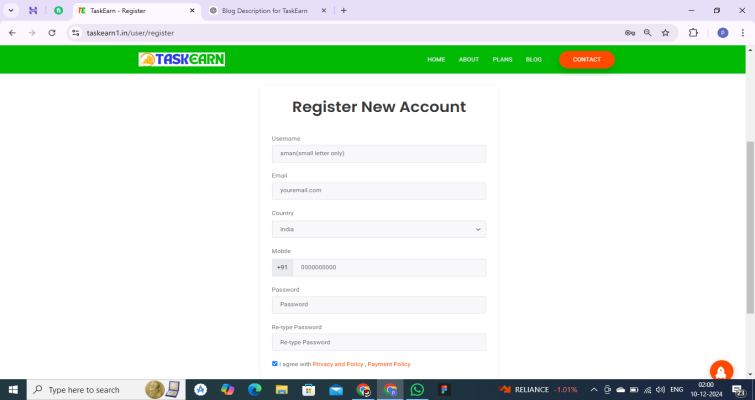
Step 3: Fill in Your Details
- Enter the following details in the registration form:
- Full Name: Enter your real name for verification purposes (only small letter only ).
- Email Address: Provide a valid email address for communication.
- Mobile Number: Enter your phone number for verification and account updates.
- Password: Create a strong password for your account.
Step 4: Agree to the Terms
- Tick the checkbox to agree to TaskEarn’s Terms and Conditions.
Step 5: Submit Your Information
- Click on the "Register" button to complete the process.
Step 6: Verify Your Email/Mobile(optional)
- You may receive a verification email or OTP on your mobile number.
- Enter the OTP or click the link in your email to verify your account.
2. Login Process
Once your account is created, you can log in to TaskEarn and start earning. Here’s how:
Step 1: Visit the Login Page
- Go to the TaskEarn login page.
Step 2: Enter Your Credentials
- Enter your registered email address or mobile number.
- Input the password you created during registration.
Step 3: Click "Login"
- Press the "Login" button to access your account.
Tips for a Seamless Experience
- Forgot Password? If you forget your password, click on the "Forgot Password" option on the login page. Follow the instructions to reset it.
- Save Your Login Details: Use the "Remember Me" option on the login page to avoid entering your credentials every time.
- Secure Your Account: Keep your password confidential and avoid sharing it with anyone.
Why Register and Log In on TaskEarn?
- Access daily tasks to earn money.
- Explore multiple earning plans tailored to your needs.
- Enjoy a secure and user-friendly platform.